Live playbook prompts
Keep discovery checklists, methodology progress and battlecards visible while the conversation is still moving.
FREE CHROME EXTENSION
Keep your playbook, qualification checklist and battlecards beside sales meetings and cold calls. Parallax runs in a Chrome side panel, so the next question is already in view.
Free to install. Includes 5 hours of free coaching without signing up. Create an account when you’re ready to save your progress.
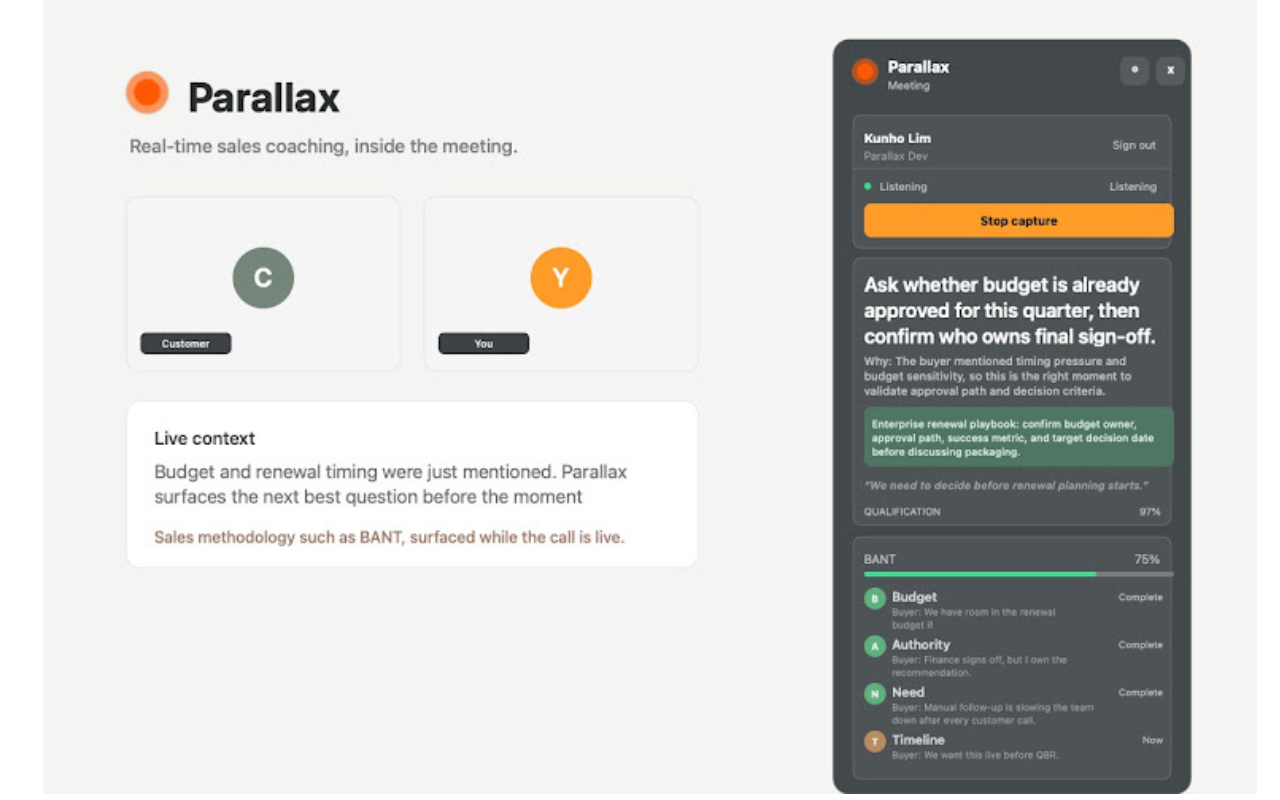
Published Chrome Web Store product illustration.
BESIDE THE CONVERSATION
Post-call review is useful. Live guidance is different. The extension keeps the useful parts of your playbook close while the buyer is still talking.
Keep discovery checklists, methodology progress and battlecards visible while the conversation is still moving.
See when you are carrying too much of the conversation or moving faster than the buyer.
Keep call notes and useful account context beside the conversation instead of in another tab.
Open the side panel in your browser workflow. No bot joins the meeting and the buyer sees nothing different.
HOW IT WORKS
Add the extension to Chrome, open the panel on a sales meeting or cold call, and create an account when you want to save your progress and unlock more.
Install the free extension from the Chrome Web Store. Chrome shows the permissions requested before anything is added.
Open the side panel on a sales meeting or cold call in Chrome. You get 5 hours of free coaching without signing up.
When you’re ready, create a free account to save your progress and unlock more coaching with Parallax.
THE PRACTICAL DETAILS
The extension is intentionally narrow: live guidance in the browser. It is not a replacement for the platform, a meeting bot or the rest of your sales stack.
WHO INSTALLS IT
Founders, account executives, outbound teams and agencies all use the same workspace differently. The extension follows the seller into the browser.
QUESTIONS, ANSWERED
Yes. The extension is free to install and includes 5 hours of free coaching without signing up. No paid plan or account is required to start. Create an account when you’re ready to save your progress and unlock more coaching.
No. Parallax runs as a side panel in Chrome. It does not join the call as a visible bot, and the buyer does not see a different meeting experience.
Use it on sales meetings and cold calls in supported browser call workflows in Chrome. Open the side panel when the conversation starts, and check the current Chrome Web Store listing and permissions for the surfaces available to you.
No. There’s no paid plan required to start, and you don’t need an account to get 5 hours of free coaching. You can create an account to save your progress and unlock more coaching with Parallax.
Chrome shows the permissions the extension requests before you install it. Audio processing and coaching data can involve Parallax cloud services. Review the listing permissions and your organisation’s policies before using it on customer calls.
Yes. Each seller installs the extension in their own Chrome browser. Team members can create accounts to connect to a shared workspace and use the same playbooks and context.
Install the free Chrome extension and keep your playbook beside the conversation.